December 24, 2025
Google recently launched its Antigravity platform, which is a new agent-based development platform. It has all the makings of a modern AI IDE.
Whether you talk about a code editor, Autocomplete, Commands, or Chat, it has it all. But that is not the point.
Google Antigravity is pushing the IDE toward an agent-first model. So, it means building Agents that can control the browser. That works asynchronously. Even so, agents that plan and execute full software tasks, not just generate code.
This is about moving from “AI helps you write code” to “AI runs work on your behalf.”
The Model Shift Behind Antigravity
Models like Gemini 3 changed the constraints. They can now:
-
- Run longer without intervention
- Reason across tools
- Operate on multiple surfaces
Not for days yet. But long enough to stop thinking in prompts.
This pushes interaction up a level, reduces micromanagement, and increases delegation.
In that world, the IDE itself has to change. Antigravity is Google’s answer to that shift.
The Core Principles
Antigravity is built around four ideas:
- Trust
- Autonomy
- Feedback
- Self-improvement
Trust, Without Overexposure
Most AI tools get this wrong. Some show everything. Every tool call. Every token.
Impossible to review.
Others show nothing. Just the final diff. No explanation. No verification.
Antigravity sits in the middle.
Work is shown at the task level, not the tool level.
-
- You see what the agent is trying to do.
- You see how far it has progressed.
- You see what it produced to prove the work is correct.
Artifacts Instead of Raw Logs
As an agent works, it generates Artifacts.
These include:
- Task lists
- Research summaries
- Implementation plans
- Walkthroughs
- Screenshots
- Browser recordings
Artifacts are meant for humans. They are easier to validate than raw tool output. Check out this video for more details:
Autonomy, Done in Stages
Most AI IDEs still assume synchronous use.
You type > The agent responds > You correct.
And Antigravity supports that too.
But the Editor view looks like a high-end AI IDE:
Inline commands
Tab completion
Including the core navigation and completion tools: Supercomplete, Tab-to-Jump, and Tab-to-Import.
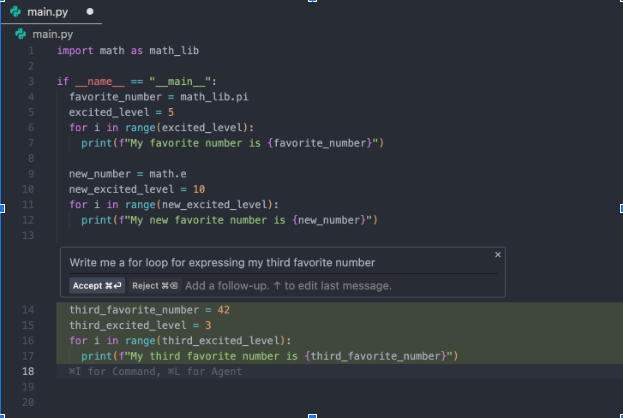
Supercomplete
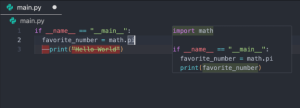
Tab-to-Jump
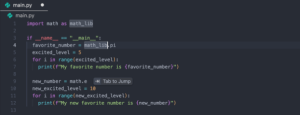
Tab-to-Import
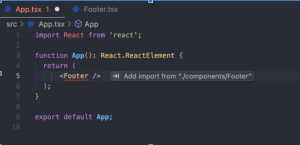
Full agent in the side panel
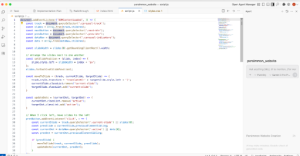
Agents That Operate Across Surfaces
With Gemini 3, agents can do more than write code.
An Antigravity agent can:
-
- Modify files
- Run commands in the terminal
- Launch a local server
- Open and control a browser
- Test features end-to-end
This allows a single task to span multiple tools without manual handoffs. It connects all of it, the code, the terminal, and the browser.
The Agent Manager
Antigravity introduces a second surface known as the Agent Manager. This flips the model. Instead of agents living inside tools, it’s tools that live inside the agent.
The Manager lets you:
- Spawn multiple agents
- Assign tasks
- Monitor progress
- Work across multiple workspaces
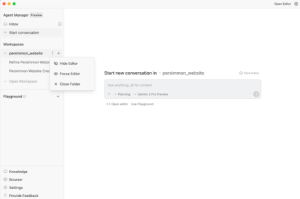
You can run background research in one workspace while focusing on active development in another.
Asynchronous by Design
Google did not try to force everything into one window.
The Editor is optimized for real-time work. The Manager is optimized for long-running tasks.
Handoffs between them are fast. Each does one job well. This is designed for a future where agents run longer and smarter.
Now, let’s talk about the comparisons that everyone is talking about these days.
Deep IDE and Model Comparison
These tools are often grouped; they should not be. Each solves a different problem.
Each assumes different workflows, and they break down at different scales.
Antigravity vs Cursor
Cursor is the benchmark. Almost every AI IDE comparison starts here.
Here is a quick infographic to help you understand the difference:

Cursor vs Antigravity – Which to use when?
Use Cursor if:
- You are writing code constantly
- Tasks are small or well-defined.
- You value speed over structure.
Use Antigravity if:
- Tasks span multiple files or tools.
- You want end-to-end validation.
- You want agents to work independently.
Antigravity vs Windsurf
Windsurf is often misunderstood. It is not a chat-based IDE.
Here is a complete comparison table for your reference:
| Feature | Windsurf (Codeium) | Google Antigravity |
| Core Paradigm | Flow-First Refactorer: Focuses on deep code transformation and keeping the dev in “flow.” | Agent-First Architect: Focuses on autonomous task completion and multi-agent management. |
| Primary Workflow | Synchronous, file-centric edits using the Cascade engine. | Asynchronous, task-centric execution via Agent Manager. |
| Autonomy Level | Semi-Autonomous: Proposes plans and modifies code, but usually requires user “checks.” | High Autonomy: Can plan, research, code, test, and verify results without constant hand-holding. |
| Testing & Validation | Limited to terminal execution and log analysis. | End-to-End: Features a built-in browser to launch apps and validate UI/UX behavior. |
| Multi-Agent Capabilities | Single active agent context (Cascade). | Multi-Agent Orchestration: Can spawn multiple agents for parallel tasks (e.g., 5 agents on 5 bugs). |
| Verification Output | Code diffs and terminal output. | Rich Artifacts: Generates task lists, screenshots, and browser recordings of the agent’s work. |
| Model Ecosystem | Supports Claude, GPT-4o, and specialized models like SWE-1. | Optimized for Gemini 3 Pro (High Context); supports Claude 4.5 and GPT-OSS. |
| Best Use Case | Massive migrations, lint fixing, and consistent codebase-wide refactors. | Building full features from scratch, automated QA/verification, and parallel bug fixing. |
Windsurf vs Antigravity: What to use when?
Use Windsurf if:
- You need safe, structured refactors
- You work in large monorepos
- You prefer deterministic changes
Use Antigravity if:
- Refactors are part of larger feature work
- You want verification artifacts
- You want agents to manage the process
Antigravity vs Trae
Trae sits in a different category. It shifts the action from development to delivery.
| Feature | Google Antigravity | Trae (ByteDance) |
| Philosophical Goal | Agentic Orchestration: Managing a team of agents for deep engineering. | Rapid Delivery: Getting a functional app live from a single prompt. |
| Core Workflow | Mission-Based: You assign a “Mission,” and agents plan and execute. | Pipeline-Based: You describe a feature, and it scaffolds, builds, and sets up CI/CD. |
| IDE Depth | Full-Spectrum: Deeply integrated with source files, terminal, and browser. | Focused/Opinionated: Thinner IDE layer; optimized for speed and automated scaffolding. |
| Validation | Internalized: Uses a built-in browser to verify logic and UI. | Externalized: Focuses on “deploying to see it work” (CI/CD orchestration). |
| Multi-Agent Use | Parallel Execution: Multiple agents working on different branches/sub-tasks. | Solo/Team Mode: Usually one specialized agent (SOLO Coder) at a time. |
| Reasoning Capture | High: Generates Artifacts (recordings/plans) to document “the why.” | Low: Focuses on the final output (executable code and deployment docs). |
| Key Advantage | Understanding huge codebases (1M+ token context). | “Zero-to-One” speed; free unlimited access to top-tier models. |
They are not really competitors if you ask me.
Antigravity operates earlier in the lifecycle. It helps design features, implement them, validate behavior, and then capture reasoning.
And then Trae can deploy what Antigravity builds. So, they are complementary, not competitors.
Model Breakdown: What Actually Changes Behavior
Models matter more than features. They define:
Planning depth: It is the extent to which a model can plan ahead.
Shallow planning:
- Reacts to the last prompt
- Optimizes for local edits
- Fails on multi-step tasks
Deep planning:
- Breaks work into stages
- racks dependencies
- Adjusts when assumptions change
Most IDEs operate at shallow depth. They respond line by line. Antigravity pushes planning into the open.
Agents:
- Generate task lists
- Outline implementation plans
- Explicitly sequence work
You can see the plan before the code. You can review it and correct it in real time.
This is not a UI feature. It is a model capability exposed by the product.
Context length: It is not just token count; it is about what the model can keep coherent.
Short context models:
- Forget earlier decisions
- Repeat mistakes
- Drift over time
Long context models:
- Maintain architectural intent
- Reference past work
- Stay consistent across files and tools
Most IDEs hide context limits, and when things go wrong, it feels random. Antigravity makes context visible through Artifacts. It has plans, summaries, and walkthroughs, which act as anchors.
They allow models like Gemini 3 to:
- Persist intent
- Re-align during execution
- Resume work after interruptions
Autonomy: It is not about running commands. It is about owning the task.
Low autonomy:
- Model waits for instructions
- User drives every step
- AI is reactive
High autonomy:
- Model decides next actions
- Uses tools independently
- Verifies results
Most IDEs cap autonomy by design. They embed the model inside the editor, restricting the tool access and forcing synchronous interaction.
Antigravity does the opposite. It is where agents are allowed to:
- Choose tools
- Switch surfaces
- Run until completion
This only works with models that can:
- Reason over long timelines
- Handle tool feedback
- Recover from errors
Gemini 3 makes this viable. The IDE simply gets out of the way. Here is a wider comparison:
Tools like Antigravity signal a shift, not a finished solution. The IDE is no longer the hardest part. The agent is.
- Planning logic.
- Task decomposition.
- Verification flows.
- Knowledge retention.
- Model selection.
These are design problems now. Most teams nowadays don’t struggle with writing code.
They are struggling with designing agents that actually work.
Where Teams Get Stuck
In practice, teams hit the same limits:
- Agents that do too much or too little
- Poor task boundaries
- No verification strategy
- Models used without understanding tradeoffs
- No persistence or learning
The tooling exists. The architecture often does not. This is where experience matters, and that’s where Primotech comes in.
How Primotech Fits Into This Shift
Primotech works at the layer above the IDE.
Not just integrating AI tools. But designing agent systems that are reliable, testable, and scalable.
That includes:
- Building task-oriented agents
- Designing verification and feedback loops
- Choosing and tuning models per workload
- Orchestrating multi-agent workflows
- Integrating agent output into real product pipelines
Whether teams are experimenting with Antigravity, Cursor, or custom setups, the challenge is the same, and that is turning model capability into usable systems.
See, it is easy to demo an agent. It is hard to trust one.
We at Primotech help teams move from:
- Prompt-driven experiments
- To task-driven agents
- To production-grade workflows
This applies to:
- Startups building faster with fewer engineers
- Enterprises modernizing development pipelines
- Product teams exploring agent-first workflows
If you have questions or want to explore agent-based development for your team, Visit https://uat.primotech.com/ai-ml-services/ or just fill out the form at https://uat.primotech.com/contact/ to get in touch with us.
Learn more about our AI advancements at http://primotech.ai/.